


Calling Raylib from PowerShell via P/Invoke
It was a quiet New Year’s for me, which caps off a pretty eventful year. I had some time off recently and have been cranking through some fun but challenging personal projects that I hope to share more about in 2026. In the meantime, I decided to blow off some steam with a silly project just to remind myself that programming can still be fun.
The Setup
PowerShell can call native C libraries directly through .NET’s P/Invoke mechanism. That means I can bind to raylib entirely from PowerShell. No C# project files, no compilation step, just a simple .ps1 script. Is this useful? Probably not, but that didn’t stop me.
I grabbed the latest version of raylib from GitHub (version 5.5), threw it into a folder called PowerShell, and created my test_raylib.ps1:
PS ~/Documents/Programming/PowerShell> (Get-ChildItem).name
raylib-5.5_linux_amd64
test_raylib.ps1
PS ~/Documents/Programming/PowerShell>
Since I’m on Fedora 43, I had to tell the dynamic linker where to find the library at the top of my script:
$env:LD_LIBRARY_PATH = "$PWD/raylib-5.5_linux_amd64/lib"
PowerShell’s Add-Type cmdlet can compile inline C# code, including P/Invoke declarations, so we can just do this to bind the library:
Add-Type -TypeDefinition @"
using System;
using System.Runtime.InteropServices;

[StructLayout(LayoutKind.Sequential)]
public struct Color {
    public byte r, g, b, a;
    public Color(byte r, byte g, byte b, byte a) {
        this.r = r; this.g = g; this.b = b; this.a = a;
    }
}

public static class Raylib {
    const string dll = "libraylib.so";

    [DllImport(dll)] public static extern void InitWindow(int width, int height, string title);
    [DllImport(dll)] public static extern void CloseWindow();
    [DllImport(dll)] public static extern bool WindowShouldClose();
    [DllImport(dll)] public static extern void BeginDrawing();
    [DllImport(dll)] public static extern void EndDrawing();
    [DllImport(dll)] public static extern void ClearBackground(Color color);
    [DllImport(dll)] public static extern void DrawCircle(int centerX, int centerY, float radius, Color color);
    [DllImport(dll)] public static extern void DrawRectangle(int posX, int posY, int width, int height, Color color);
    [DllImport(dll)] public static extern void DrawText(string text, int posX, int posY, int fontSize, Color color);
    [DllImport(dll)] public static extern int GetKeyPressed();
    [DllImport(dll)] public static extern bool IsKeyReleased(int key);
    [DllImport(dll)] public static extern void SetTargetFPS(int fps);
}
"@
Then we set up some variables:
# Colors
$red = [Color]::new(230, 41, 55, 255)
$green = [Color]::new(0, 228, 48, 255)
$raywhite = [Color]::new(245, 245, 245, 255)
$darkgray = [Color]::new(80, 80, 80, 255)

# Key codes
$KEY_A = 65
$KEY_D = 68
$KEY_LEFT = 263
$KEY_RIGHT = 262

# Game state
$playerX = 400
$ballX = 400
$ballY = 300
$ballDX = 3
$ballDY = 3
$score = 0
$movingLeft = $false
$movingRight = $false
And then call the functions from PowerShell:
# Initialize window
[Raylib]::InitWindow(800, 600, "PowerShell Pong-ish!")
[Raylib]::SetTargetFPS(60)

# Game loop
while (-not [Raylib]::WindowShouldClose()) {
    # We've got to do this manually
    $pressed = [Raylib]::GetKeyPressed()
    if ($pressed -eq $KEY_LEFT -or $pressed -eq $KEY_A) { $movingLeft = $true }
    if ($pressed -eq $KEY_RIGHT -or $pressed -eq $KEY_D) { $movingRight = $true }

    # Check for key releases
    if ([Raylib]::IsKeyReleased($KEY_LEFT) -or [Raylib]::IsKeyReleased($KEY_A)) { $movingLeft = $false }
    if ([Raylib]::IsKeyReleased($KEY_RIGHT) -or [Raylib]::IsKeyReleased($KEY_D)) { $movingRight = $false }

    # Apply movement
    if ($movingRight -and $playerX -lt 700) { $playerX += 6 }
    if ($movingLeft -and $playerX -gt 0) { $playerX -= 6 }

    # Ball movement
    $ballX += $ballDX
    $ballY += $ballDY

    # Ball collision with walls
    if ($ballX -le 10 -or $ballX -ge 790) { $ballDX = -$ballDX }
    if ($ballY -le 10) { $ballDY = -$ballDY }

    # Ball collision with paddle
    if ($ballY -ge 480 -and $ballY -le 500 -and $ballX -ge $playerX -and $ballX -le ($playerX + 100)) {
        $ballDY = -$ballDY
        $score++
    }

    # Ball fell off bottom - reset
    if ($ballY -gt 620) {
        $ballX = 400
        $ballY = 300
        $score = 0
    }

    # Draw
    [Raylib]::BeginDrawing()
    [Raylib]::ClearBackground($raywhite)
    [Raylib]::DrawRectangle($playerX, 500, 100, 20, $darkgray)
    [Raylib]::DrawCircle($ballX, $ballY, 10, $red)
    [Raylib]::DrawText("Score: $score", 10, 10, 20, $darkgray)
    [Raylib]::DrawText("A/D or Arrow keys to move", 10, 40, 16, $green)
    [Raylib]::EndDrawing()
}

[Raylib]::CloseWindow()
And that’s it!
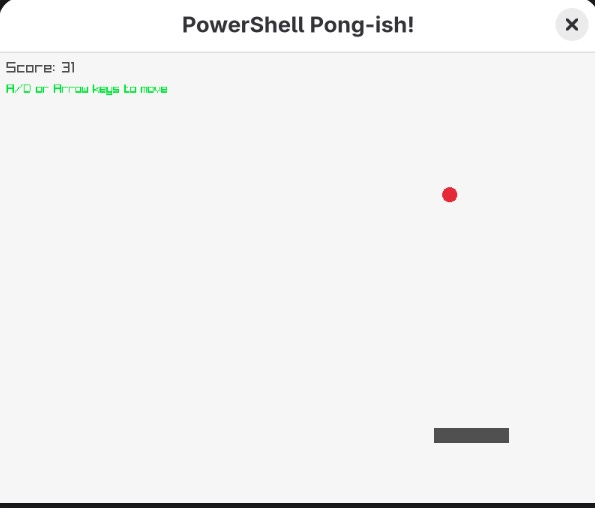
Well, not quite. It took a few tries to get it right. And you’ll quickly see one of the many flaws with this approach if you try it yourself.
The Gotchas
When iterating on your P/Invoke definitions, you will run into errors like this:
Cannot add type. The type name 'Color' already exists.Once Add-Type compiles and loads a type into the .NET runtime, it cannot be unloaded or redefined within the same PowerShell session. Your options are:
Restart PowerShell every time you change the type definitions
Rename your types during development (Color → RLColor2 → RLColor3... definitely not what I did)
Use namespaces with version numbers
Compile to a DLL once your bindings are stable
The other major challenge was on Fedora 43 with Wayland: IsKeyDown() always returned false, even though GetKeyPressed() worked fine. Who knows why this happens.
The solution was to track key state manually using the event-based functions:
# We've got to do this manually
$pressed = [Raylib]::GetKeyPressed()
if ($pressed -eq $KEY_LEFT -or $pressed -eq $KEY_A) { $movingLeft = $true }
if ($pressed -eq $KEY_RIGHT -or $pressed -eq $KEY_D) { $movingRight = $true }

# Check for key releases
if ([Raylib]::IsKeyReleased($KEY_LEFT) -or [Raylib]::IsKeyReleased($KEY_A)) { $movingLeft = $false }
if ([Raylib]::IsKeyReleased($KEY_RIGHT) -or [Raylib]::IsKeyReleased($KEY_D)) { $movingRight = $false }
Not something I’d want to do in a larger program, but it works for this small example.
And that’s all I’ve got for today. Happy New Year’s everyone!
Call To Action 📣
Hi 👋 my name is Diego Crespo and I like to talk about technology, niche programming languages, and AI. I have a Twitter Mastodon, and Threads if you’d like to follow me on other social media platforms. If you liked the article, consider liking and subscribing. And if you haven’t why not check out another article of mine listed below! Thank you for reading and giving me a little of your valuable time. A.M.D.G
The case for PowerShell On macOS and Linux

Often dismissed as an eccentric and verbose scripting language from Microsoft, PowerShell frequently finds itself relegated to the background when it comes to shell languages on non-Windows platforms. Mocked as a lackluster corporate attempt at mimicking a genuine shell scripting language, it rarely receives the attention it deserves. However, after lev…